Object locking feature
Object locking is a new feature, that exists for certain test accounts at Safespring storage. Object locking makes all objects uploaded to a bucket immutable for a certain time, which makes it impossible to delete uploaded objects before that time has passed. For instance, if a timer on one month is configured on a bucket, all objects uploaded to that bucket will be immutable and locked for a month before they can be deleted.
This is very useful as a protection for crypto-lockers which are getting more and more advanced and also attacks the backup solution to prevent an easy recovery from such an attack. By enabling Object locking the malevolent software will not be able to the delete backups which will make it possible to recover.
Creating buckets that allow object locking
In order to use object locking you need to specify at creation time that the bucket is to allow locking of objects, this can be done with minios "mc" or with aws-cli command:
mc —with-lock mb ceph/mybucket
aws --endpoint=$S3_URL s3api create-bucket --bucket=bucketnamehere --object-lock-enabled-for-bucket
Note
Object lock can only be enabled at bucket creation time. It cannot be added to an existing bucket.
Retention modes
Object lock supports two retention modes: COMPLIANCE and GOVERNANCE. Both modes prevent objects from being deleted or overwritten during the retention period, but they differ in how strictly the protection is enforced.
COMPLIANCE mode
In COMPLIANCE mode, a locked object version cannot be deleted or overwritten by any user, including the account owner. The retention period cannot be shortened. This mode is intended for regulatory requirements where data must be preserved for a defined period.
To upload an object with COMPLIANCE retention:
aws --endpoint=$S3_URL s3api put-object \
  --bucket mybucket \
  --key myfile.txt \
  --body myfile.txt \
  --object-lock-mode COMPLIANCE \
  --object-lock-retain-until-date "2026-03-01T00:00:00Z"
GOVERNANCE mode
In GOVERNANCE mode, objects are protected from deletion and overwriting, but users with the s3:BypassGovernanceRetention permission can bypass the protection. This mode is useful for internal policies where an administrator may need to remove objects before the retention period expires.
To upload an object with GOVERNANCE retention:
aws --endpoint=$S3_URL s3api put-object \
  --bucket mybucket \
  --key myfile.txt \
  --body myfile.txt \
  --object-lock-mode GOVERNANCE \
  --object-lock-retain-until-date "2026-03-01T00:00:00Z"
To delete a GOVERNANCE-locked object before the retention period expires, use the --bypass-governance-retention flag:
aws --endpoint=$S3_URL s3api delete-object \
  --bucket mybucket \
  --key myfile.txt \
  --version-id VERSION_ID \
  --bypass-governance-retention
Setting a default retention policy on a bucket
Instead of specifying retention on each upload, you can set a default retention configuration on the bucket. All objects uploaded to the bucket will then automatically inherit this retention policy.
aws --endpoint=$S3_URL s3api put-object-lock-configuration \
  --bucket mybucket \
  --object-lock-configuration '{"ObjectLockEnabled":"Enabled","Rule":{"DefaultRetention":{"Mode":"COMPLIANCE","Days":30}}}'
To check the current retention configuration:
aws --endpoint=$S3_URL s3api get-object-lock-configuration \
  --bucket mybucket
Legal hold
In addition to retention periods, objects can be placed under a legal hold. A legal hold has no expiration date and remains in effect until explicitly removed. It can be applied independently of any retention mode.
To place a legal hold on an object:
aws --endpoint=$S3_URL s3api put-object-legal-hold \
  --bucket mybucket \
  --key myfile.txt \
  --legal-hold '{"Status":"ON"}'
To remove a legal hold:
aws --endpoint=$S3_URL s3api put-object-legal-hold \
  --bucket mybucket \
  --key myfile.txt \
  --legal-hold '{"Status":"OFF"}'
To check the legal hold status:
aws --endpoint=$S3_URL s3api get-object-legal-hold \
  --bucket mybucket \
  --key myfile.txt
Inspecting object retention
To check the retention mode and date of a specific object:
aws --endpoint=$S3_URL s3api get-object-retention \
  --bucket mybucket \
  --key myfile.txt
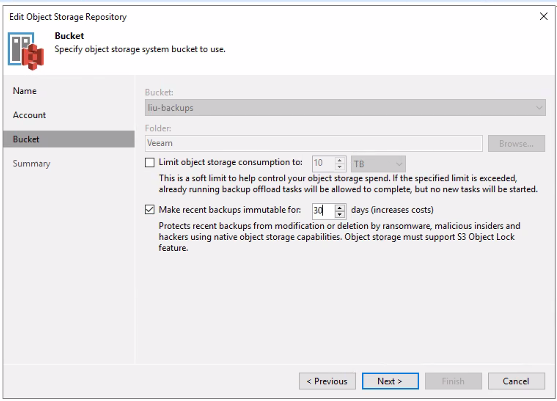
Object locking in Veeam
The latest versions of Veeam Backup has support for this feature and can be enabled when creating an Object Storage Repository in Veeam: