Flavors
This page includes OpenStack CLI commands. See the API Access documentation for instructions on how to install and configure the command line client.
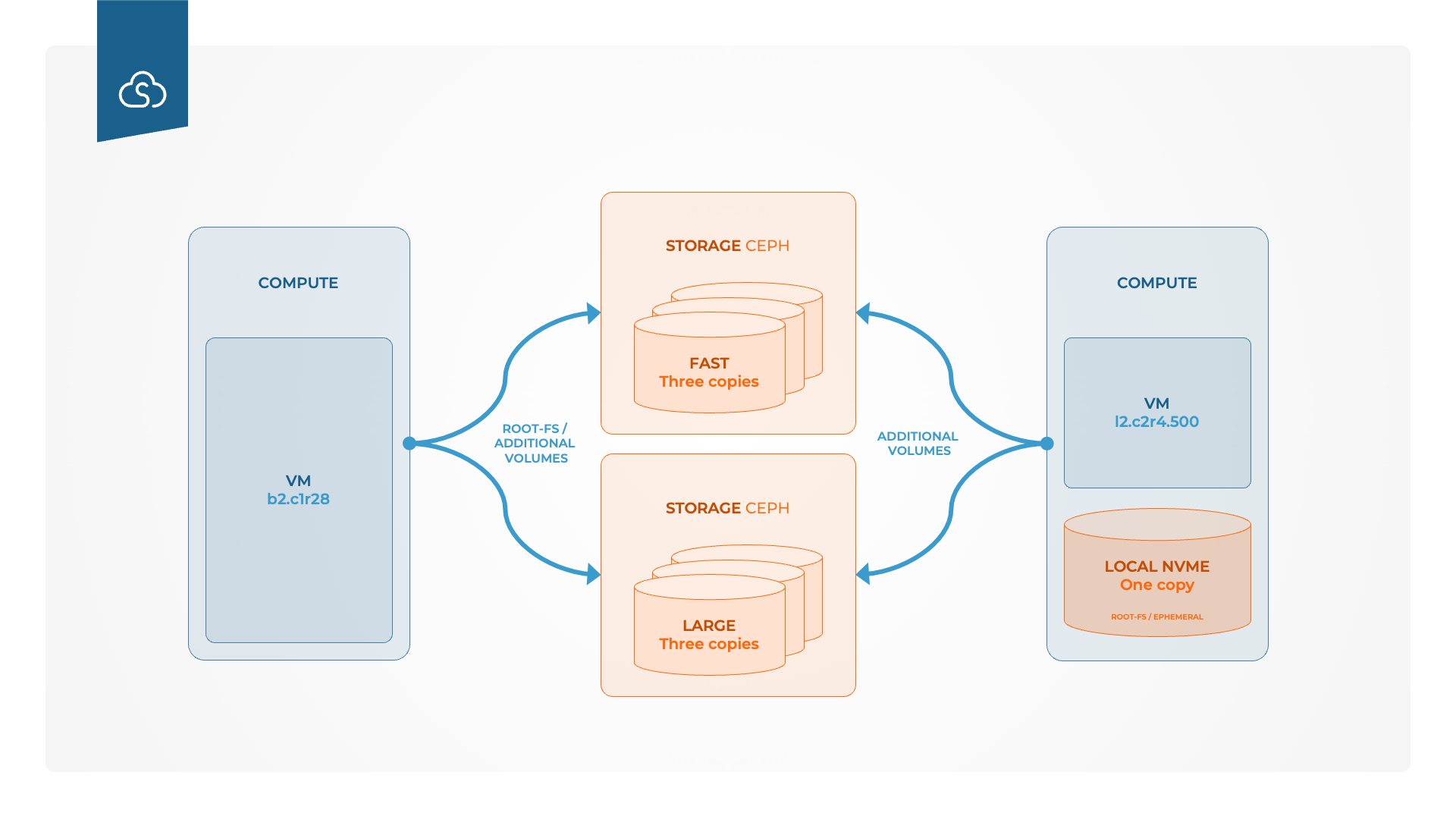
Flavors define the compute, memory, storage model, and performance profile of an instance. The most important distinction in Safespring Compute is whether you use:
b2flavors (b= block storage) for resilient, volume-backed instances on shared block storagel2flavors (l= local disk) for high local-disk performance with higher recovery responsibility
GPU flavors
For GPU-enabled flavors, see the GPU flavors documentation.
What should I choose?
- Choose
b2if you want the safer default for general virtual machines, stateful services, and workloads where fast recovery matters. - Choose
l2if you need very high local disk performance and your workload can tolerate loss of a node-local root disk or be recreated quickly.
Quick comparison
| Flavor type | Boot from | Storage location | Best for | Main trade-off |
|---|---|---|---|---|
b2 |
Volume created from an image | Shared block storage | General-purpose servers, stateful workloads, safer recovery | Lower raw local-disk performance than l2 |
l2 |
Image | Local NVMe disk on the compute host | High-IOPS workloads, clustered systems, ephemeral nodes | If the local disk fails, the instance cannot be restored by Safespring |
Key limitations
b2flavors must be booted from a volumel2flavors must be booted from an imageb2flavors cannot be resized tol2flavors, andl2flavors cannot be resized tob2- Non-GPU flavors cannot be resized to GPU flavors, and GPU flavors cannot be resized to non-GPU flavors
- Special flavors cannot be resized to standard flavors, and vice versa
Flavor naming
The first part of the flavor name combines storage family and generation. For example, b2 means block-storage-backed generation 2, while l2 means local-disk generation 2. Safespring may introduce other generations in the future with different properties.
Examples:
b2.c4r16means generationb2,4vCPUs,16GB RAMl2.c8r16.500means generationl2,8vCPUs,16GB RAM, and500GB local disk
Available b2 flavors
Use b2 when you want instances backed by shared block storage.
| Flavor | vCPU | RAM (MB) | Root disk |
|---|---|---|---|
b2.c1r2 |
1 | 2048 | 0 |
b2.c1r4 |
1 | 4096 | 0 |
b2.c2r4 |
2 | 4096 | 0 |
b2.c2r8 |
2 | 8192 | 0 |
b2.c4r8 |
4 | 8192 | 0 |
b2.c4r16 |
4 | 16384 | 0 |
b2.c8r16 |
8 | 16384 | 0 |
b2.c8r32 |
8 | 32768 | 0 |
b2.c16r32 |
16 | 32768 | 0 |
b2.c16r64 |
16 | 65536 | 0 |
Available l2 flavors
Use l2 when local NVMe performance matters more than recoverability of the node-local root disk.
| Flavor | vCPU | RAM (MB) | Local disk (GB) | Read IOPS | Write IOPS |
|---|---|---|---|---|---|
l2.c2r4.100 |
2 | 4096 | 100 | 10000 | 5000 |
l2.c2r4.500 |
2 | 4096 | 500 | 50000 | 25000 |
l2.c2r4.1000 |
2 | 4096 | 1000 | 100000 | 50000 |
l2.c4r8.100 |
4 | 8192 | 100 | 10000 | 5000 |
l2.c4r8.500 |
4 | 8192 | 500 | 50000 | 25000 |
l2.c4r8.1000 |
4 | 8192 | 1000 | 100000 | 50000 |
l2.c8r16.100 |
8 | 16384 | 100 | 10000 | 5000 |
l2.c8r16.500 |
8 | 16384 | 500 | 50000 | 25000 |
l2.c8r16.1000 |
8 | 16384 | 1000 | 100000 | 50000 |
l2.c16r32.100 |
16 | 32768 | 100 | 10000 | 5000 |
l2.c16r32.500 |
16 | 32768 | 500 | 50000 | 25000 |
l2.c16r32.1000 |
16 | 32768 | 1000 | 100000 | 50000 |
Boot and storage model
Booting b2 flavors
Instances created with b2 flavors do not include root disk in the flavor itself. In the Horizon interface, you will see 0 in the Root Disk column for these flavors.
To boot a b2 instance:
- Create a volume
- Select
ImageasVolume Source - Choose the desired image
- Launch the instance from that volume
You can also start from the Volumes view and use Launch as Instance after the volume has been created from an image.
Pro tip
After creating the volume from the image, you can start from the Volumes view and click Launch as Instance in the context menu for the new volume. The Launch Instance dialog will open with the correct Source settings already selected.
l2 flavors
l2 flavors include a root disk in the flavor itself. The l stands for local disk, meaning the instance boots with storage on the compute host’s local NVMe.
To boot an l2 instance:
- Open the
Launch Instancedialog - In the
Sourcetab, chooseImage - Boot directly from the image
The image is copied to the local root disk before the instance starts.
Failure and recovery model
Recovery with b2 flavors
b2 flavors use shared block storage. This means:
- storage disk failures are typically handled in the storage layer
- compute host failures are easier to recover from because the root disk lives outside the compute host
- migrating an instance to another compute host is faster than with local-disk-backed instances
In many cases, customers will not notice an underlying storage disk failure before Safespring operations has already started handling it. If a storage disk fails, Safespring operations detects and replaces the failed disk, while the storage cluster starts copying data to another disk to preserve data integrity.
Recovery with l2 flavors
l2 flavors are designed for workloads where very high read and write performance matters, for example:
etcdin Kubernetes- clustered database members
- storage-intensive ephemeral workloads
Important note
l2 flavors deliver high performance, but the root disk is a single point of failure. If the local disk fails, the instance cannot be restored by Safespring. Use l2 only for stateless workloads, well-backed-up systems, or clusters that can recreate failed nodes quickly.
When using l2 flavors as members of a cluster, Safespring recommends using Server Groups with anti-affinity so that nodes are spread across different compute hosts.
Do not use l2 for ordinary stateful servers that cannot be restored by launching a new instance and reattaching or rebuilding the application state.
IOPS behavior
b2 flavors
For b2, the IOPS quota is determined by the attached volume type, not by the flavor itself.
For fast volumes:
100read IOPS and50write IOPS per GB- upper limit:
100000read IOPS and50000write IOPS
Examples:
10 GBvolume ->1000read IOPS /500write IOPS20 GBvolume ->2000read IOPS /1000write IOPS
For large volumes:
2IOPS per GB for both read and write- lower limit:
50read IOPS and50write IOPS - upper limit:
4000read IOPS and4000write IOPS
Example:
100 GBvolume ->200read IOPS /200write IOPS
Volumes smaller than 25 GB still receive the lower limit of 50 read IOPS and 50 write IOPS.
These limits apply to all mounted volumes on the instance, not just the boot disk.
l2 local disk IOPS
For l2, the reserved IOPS scale with the amount of local disk included in the flavor:
- a flavor ending in
.500reserves five times the IOPS of a flavor ending in.100 - a flavor ending in
.1000reserves ten times the IOPS of a flavor ending in.100
That means larger l2 disk sizes are not only larger, but also faster.
If you have API access, you can inspect flavor metadata with:
openstack flavor list --long
Resizing
Thanks to improvements in the underlying compute platform, self-service resizing between compatible flavor sizes is now supported. However, the platform does not prevent every invalid conversion.
The customer is responsible for ensuring flavor compatibility before starting a resize.
Conclusion
Boot l2 flavors from Image. Boot b2 flavors from a volume created from an image. Invalid combinations, such as booting l2 from volume or b2 from image, will fail.
We strongly recommend creating a backup before resizing, even between compatible flavors. The safest option is still to recreate the server and reattach the operating system volume when possible. Use resize only when recreate and reattach is not feasible.
Please note:
- resizing is an offline operation
- the instance is shut down before the resize starts
- resize duration depends on the instance configuration
- large
l2flavors can take significantly longer to resize
Pricing
The full Safespring pricing list and associated public flavors can be found at Price list and Calculator. You do not need to enter your e-mail address; scroll to the bottom of the page to see the public pricing list.